Dream Journal
A dream journal page with space for the dream itself, key symbols and people, the emotions you felt, what it might mean, and whether it was recurring, lucid or vivid. Free PDF, or write on it with Apple Pencil.
Free · no sign-up · PDF works for printing and in any note or journal app. Premium template in the app.
About this template
Dreams fade within minutes of waking, so the page is built to be filled fast: note when you slept and woke, give the dream a title, then write it out freely. Below, list the symbols and people that appeared, tick the emotions you felt, and jot down what it might mean. Tick boxes for recurring, lucid and vivid dreams make patterns easy to spot when you flip back through a month of entries.
How to use it
- Keep the journal (or your iPad) next to the bed and write before you check your phone.
- Write in the present tense — “I'm standing in a hallway” — it brings back more detail.
- Record fragments too; a single image is enough to start a pattern.
- Once a month, reread and circle symbols that keep coming back.
Who it's for
- Journalers: Reflect & document life
- Wellness Seekers: Balance mind, body & soul
- Creatives: Capture ideas & inspiration
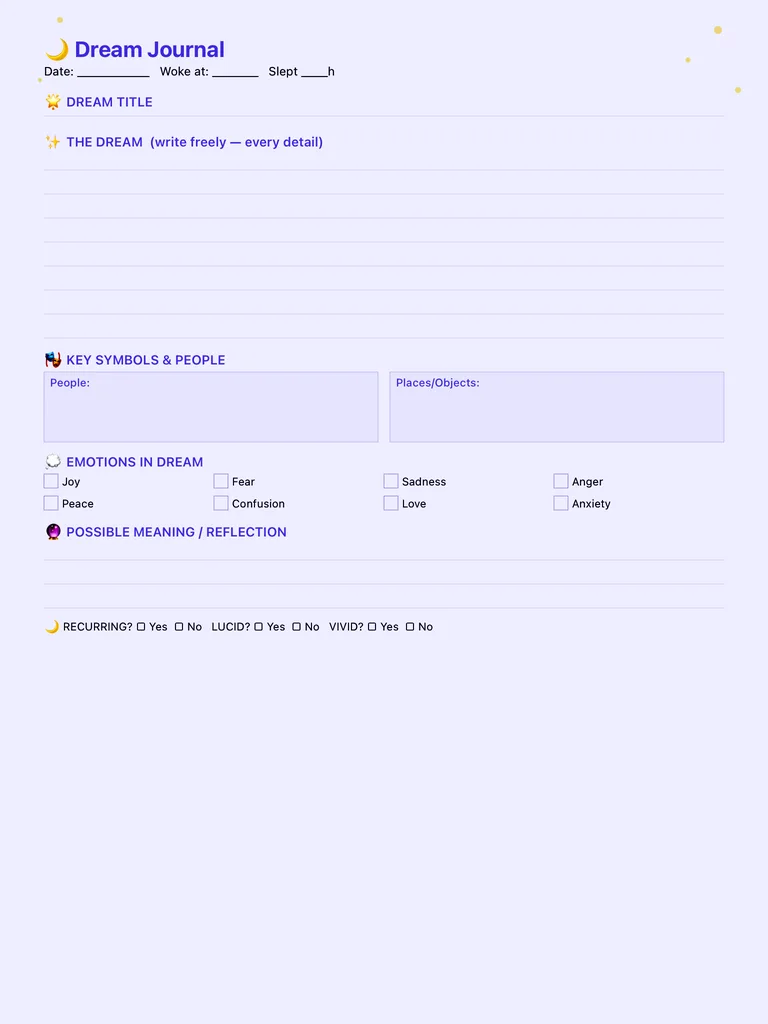
Write with Apple Pencil, a mouse or your finger. Your page is saved in this browser.

Use the Dream Journal in Journal for iPad
A new page every day, 145 templates, guided 30-day programs and Face ID lock — made for Apple Pencil.
Frequently asked questions
How do I start a dream journal?
Put the journal by your bed, and each morning write whatever you remember before doing anything else — even a single image. Recall usually improves within a couple of weeks of daily practice.
Does keeping a dream journal help with lucid dreaming?
Many people who practise lucid dreaming start with a dream journal, because it trains dream recall and helps you notice recurring dream signs. This page has a checkbox to mark lucid dreams.
Can I keep a dream journal on my iPad?
Yes. Write on this template with Apple Pencil in your browser, or use the dream journal template in the Journal for iPad app so every morning starts with a fresh page.